
How to File an Extension for Your Sub-Chapter S Corporation
Sub-Chapter S Corporation tax returns (1120S) are due on March 15th. Are you done yet? If not, you might need to file for an extension. Here’s how:
First, make sure you really are a Sub-S Corp. I know that sounds silly, but every year (really, every year) I run into someone who thinks they have a Sub-S Corporation and doesn’t. It’s really important not to file paperwork for an entity that you’re not. If you’re an LLC that wants to be a Sub-S and you’re filing a “Whoopsie, I forgot to do the right paperwork clause,” you can’t file an extension, you’ve got to get your stuff in by March 15th.
But if you’re already a Sub-S corporation, then you can file for an extension if you need to. What you want is Form 7004. Here’s a link to it: http://www.irs.gov/pub/irs-pdf/f7004.pdf.
It’s easiest to just file it online and be done with it. But if you don’t have access to the software, you can paper file. Here’s the official list of mailing addresses: http://www.irs.gov/file/article/0,,id=177836,00.html . Basically, if you’re east of the Mississippi you’ll mail it to:
Department of the Treasury
Internal Revenue Service
Cincinnati, OH 45999-0045
If you’re west of the Mississippi it will go to:
Ogden, UT 84201-0045
For some reason Florida and Louisiana are listed with the “west of the Mississippi states.” Anyway, Florida and Louisiana get mailed to Ogden. Also, any Sub-S with income of over $10 million sends its extension to Ogden no matter where the business is located. (Any Sub-S with income of over $10 million should have an accountant that can file the extension for them and you shouldn’t be reading a how-to blog about it. Seriously.)
You’ll have to check with your state to determine if you are required to file a separate extension for your state. Here in Missouri, your federal extension will serve as your state extension – you’ll just attach a copy of your Federal 7004 to your Missouri 1120S when you file it. You only need to file a MO 7004 if you have a franchise tax liability.
Why should you care about filing an extension? Money! If you don’t owe any money on your tax return, the penalty for filing late is $195 for each month (or part of a month) that the return is late, multiplied by the number of shareholders. So let’s say you and a buddy have a Sub-S corporation and you forget about the March 15th deadline and file on April 15th instead. You’ll owe a $390 penalty on a tax return with no balance due. That stinks. Of course, if you totally blow things off and file in August, the penalty will be $1,560 – on a tax return with a zero balance due! See why it’s important to file that extension?
Sub S corporations generally don’t pay tax with their corporate form, but if you do owe money for some reason the penalties are even higher.
Even though extensions are fairly simple forms, you still might not want to do it yourself. This is one form that Roberg Tax Solutions can prepare for you over the phone for $25. You’ll need your business name, address, EIN number and a credit card and we can do it while you’re on the phone with us. It’s that easy. You have no reason not to get your extension in on time.
Getting Your Tax Return Information for Your FAFSA
One thing that I spend a lot of time on is helping people prepare their FAFSA forms for college. (FAFSA stands for Free Application for Federal Student Aid.) Well, the IRS has a “data retrieval tool” that you can use to just import your tax return information right into your FAFSA application. How cool is that?
This is the information that I received from the IRS:
Use the IRS Data Retrieval tool when applying for a student loan
If you are a student or parent you can now access your IRS tax return information using the 2012-2013 IRS Data Retrieval Tool. This is an easy and secure way to access and transfer your tax return information directly into your Free Application for Federal Student Aid form.
If you are eligible to use the IRS Data Retrieval Tool, we highly recommend using the tool for several reasons:
- It’s the easiest way to provide your tax data.
- It’s the best way of ensuring that your FAFSA has accurate tax information.
- You will not need to provide a copy of your or your parents’ tax returns for your financial aid application.
Who can use it?
If you or your parents meet the following criteria, you’ll be given the option to retrieve, display and transfer your federal tax information:
- If you filed a 2011 tax return
- If you have a valid Social Security Number
- If you have a Federal Student Aid PIN
- If you do not have a PIN, you will be given the option to apply for one
- If your marital status has not changed since Dec. 31, 2011.
Who should not use it?
If any of the following conditions apply to you or your parents, you should not use this tool:
- If you filed an amended federal tax return for 2011
- If you did not file a federal tax return for 2011
- If your 2011 federal tax filing status is married filing separately
- If you filed both a federal tax return and a foreign return
If you do not use the IRS Data Retrieval Tool to provide tax information and your college requests a copy of your tax return or your parents’ tax return, you may be required to obtain an official tax transcript from the IRS. To order tax transcripts, go to Order a Return or Account Transcript at www.IRS.gov.
Okay, it’s back to me talking again. One last thing about the FAFSA – it’s free! Make sure you go to the right website to complete your FAFSA application; this is it: http://www.fafsa.ed.gov/. There’s a fake FAFSA website where they charge you money to apply, so make sure that you’re on the official website. The IRS will only link with the real FAFSA site, so that’s another clue you’re in the right place. And good luck with college!
How to Prepare the FBAR Form, TD F 90-22.1
So you were working on your tax return and you read that you needed to prepare a form TD F 90.22.1, right? That’s a mouthful isn’t it? That’s why it’s been nicknamed the FBAR. If you need to file the FBAR, it’s really not that difficult. Let me walk you through it.
First, you need the form. It’s on the IRS website, here’s a link to get it: http://www.irs.gov/pub/irs-pdf/f90221.pdf. Most software programs do not include the FBAR form in them. My professional software finally added the FBAR this year, which makes it an incredible time saver, but most at home programs still don’t include it because the FBAR isn’t filed with your income tax return. I’m going to give you the instructions based on doing the form on the IRS website.
First, for Box 1, in the upper right hand corner, you’ll need to input the year. So right now you’re doing 2011. The input is a little goofy – you have to hit tab to get to the next number. You’ll type 2 tab 0 tab 1 tab 1. As you try to move through the document, the tab key can always get you to the next box. (I prefer using the mouse myself, but the tab key will get you where you need to go.)
Box 2, Type of Filer: I’m usually working with individuals, but partnerships, corporations and trusts with foreign accounts are all required to report these accounts. If you’re a person filing a 1040, you would check “individual.” If you are a married couple and you and your spouse both have foreign accounts, you would each file an FBAR in your own name.
Box 3, US Taxpayer Identification Number: that’s going to be your Social Security Number or ITIN. If you don’t have one, you’ll need to complete box 4; otherwise box 4 is left blank.
Boxes 5 through 13 are pretty simple: your date of birth, your name, and where you live. Where is says “Country,” it refers to the country where you live, not the country your bank account is in.
Box 14 asks if you have 25 or more financial accounts. Most people just have one or two. But if you have 25 or more check the “yes” box and you don’t have to fill out parts 2 and 3. I also suspect that you’d better keep really good records for the IRS if you check the yes box, so don’t check “yes” just to avoid having to fill out the other parts. You’re basically telling the IRS that your accounts will require more scrutiny if you do.
Part II is about your actual accounts. Box 15 is asking for the maximum amount of funds that you had in the account all year. They are asking about the account in US Dollars. (You can see my post about reporting interest income to learn how to use the currency converter if you need help with that.) What I mean by the maximum amount of funds during the year is exactly that. What’s the most money that was in there all year? For example: let’s say you started the year with $20,000 USD, and you ended the year with $20,000 USD – well you’d think that you’d put $20,000 USD down in the box. But, maybe you transferred $10,000 USD into the account in the middle of the year to help your parents buy a new house. So that means the highest amount you had in that bank account was $30,000 USD, even though that amount was only temporary.
Box 16 is what type of account – bank, securities, or other.
Boxes 17 through 23 are all basic – name of bank, address of bank, what’s your account number, etc.
If you have more than one foreign account, there are continuation pages where you can list your other accounts. If you only have one foreign account, you’re almost done.
Be sure to sign the form at the bottom. If you’re an individual, you don’t need to put anything in the title box. Don’t forget to date your return.
The FBAR does not go with your federal income tax return. It gets mailed separately to an address in Detroit:
Department of the Treasury
Post Office Box 32621
Detroit, MI 48232-0621
The FBAR form is not required to be filed until June 30th. But why would you wait? Since you’re doing this because you had to report the information on your US income tax return, just finish the FBAR form and mail it in now so you don’t forget.
More FBAR information: http://www.irs.gov/businesses/small/article/0,,id=148849,00.html
How to Report Your Foreign Bank Interest on Your US Income Tax Return
Maybe you’ve heard the stories in the news. The IRS is cracking down on persons with foreign bank accounts who don’t report their income. The penalties for not reporting can be severe. So how do you report your foreign bank account income anyway? Surprisingly, it’s not really all that hard.
The first thing to do is to take a look at your foreign bank statement. Did you earn any interest on the account? How much?
Okay, but I’m guessing your statement is in a foreign currency. So you’re going to have to use a currency conversion rate. While there are several currency exchange websites, I like to use the US Department of Treasury exchange. That’s the one the IRS links to, so when I’m working on tax forms I like to use that rate. Here’s the link: http://fms.treas.gov/intn.html#rates
When you go to the exchange site, you’ll notice that the list is by country name, in alphabetical order. So let’s say that your foreign bank account deals in rupees; we’ll scroll down until we find India-Rupee. The exchange rate for rupees on December 31, 2011 was 52.25 rupees to one US dollar. So if you had earned interest of 1000 rupees in an Indian bank, that would be the equivalent of $19.14 USD. (Because you would take 1000 and divide by 52.25. That equals 19.13876, which you’d round to $19.14.)
You’d report that interest on Schedule B of your US income tax return.
At the bottom of the Schedule B form there is a question:
At any time during 2011, did you have a financial interest in or signature authority over a financial account (such as a bank account, securities, account, or brokerage account) located in a foreign country? See instructions.
It’s a yes or no answer. If you read the instructions, you’ll find that you don’t have to say “yes” unless your foreign bank account has had the equivalent of $10,000 USD or more in it. If your foreign bank or securities accounts do have more than $10,000 in them, you will be required to complete the FBAR form, also known as the TD F 90-22.1. (I’ll make another post about that later this week.) The FBAR is not sent with the 1040 so you can do that separately from your tax return.
If you are filing an FBAR, the IRS wants you to list the name of the country that your bank account is in on your 1040. There’s a little blank space right after the question about foreign accounts.
And don’t forget to answer the last question about foreign trusts. To be honest, I don’t do foreign trusts, so I’ve never had to say yes. If you’re involved with a foreign trust, you’re going to want to look elsewhere to get more information. But, if you don’t have a foreign trust, you just have to remember to mark the box “no”.
Now that you see how easy it is to report your foreign interest income, you don’t have to worry about the IRS coming to call over your foreign bank account.
Can I Deduct My Work Clothes as a Business Expense?
Now, if you’re a regular reader of my blog then you already know I’m going to say, “It depends.” But for about 90% of the people asking that question, the answer’s going to be, “No.” If you have to wear a suit and tie to work, or ladies, if you have to wear hose with your dress – that doesn’t count as a deductible work clothing expense. A lot of offices have dress codes, but adhering to a dress code does not qualify those clothes for a business deduction.
Okay then, so what does? A uniform, like for a police officer or a mail carrier. Clothing that’s not a necessarily a uniform but is required for the job – for example, a chef jacket or doctor’s scrubs. Or logo clothing that could also be considered a work uniform – like the shirt’s they wear at McDonald’s or the cleaning company that takes care of my office building.
What about Macy’s, where all the employees have to wear black? That’s a good example because wearing black at Macy’s is a requirement and I’ve heard Macy’s workers refer to that as their “uniform,” but unfortunately, that doesn’t meet the IRS test of a uniform. Although everyone has to wear black, there is no “standard” Macy’s uniform and the clothing has no Macy’s logo, so in a situation like that, there would be no tax deduction.
So let’s go back to the McDonald’s example again. Let’s say you have to wear the uniform shirt, but you can wear any pants you want to as long as they’re black, can you deduct the pants? No, because you can wear any pants as long as they’re black. If McDonald’s has special pants with a Mickey D’s logo on it, or something special to go with their uniform shirts, then that would be a deductible expense, but plain black pants are not.
Any kind of safety clothing would count as deductible: safety goggles, reflective vests, work gloves, and steel toe boots all come to mind there. If you’re in a job that requires protective gear, I count the gear as a deductible business expense.
If you’re self-employed, these expenses go right onto your Schedule C and it’s a direct offset against your income. If you’re working for someone else, then your clothing expenses would go on your form 2106 – Employee Business Expenses. They’re subject to the 2% limitation rule (meaning you have to spend more than 2% of your total income on work stuff before you qualify for a deduction).
Remember, if your clothing does qualify as deductible, then cleaning it is also deductible. I actually sat and worked this out with some med students that I was doing taxes for: scrubs only – one load a week. Scrubs and lab coats: two loads. For one load a week, take a $250 deduction; two loads, double it. If you have to dry clean your uniforms, save those receipts because that really adds up. Since most people do their laundry at home (and the laundromat doesn’t give out receipts), you do not need receipts for doing your laundry. Of course, cleaning of a regular business suit or laundering of regular business shirts does not count as a deductible expense.
How To Get an Individual Tax Identification Number
An Individual Tax Identification Number (ITIN) is for people who live in the United States but do not qualify for a Social Security Number. If you’re here working in the US, you should have been issued a Social Security Number, but your spouse and children weren’t. In order to claim them on your US income tax return, you’ll need to obtain ITINs. Here are my instructions for the best way to do it.
First, you’ll have to fill out the right form. It’s called a W7 and here’s a link to the IRS website to download it: http://www.irs.gov/pub/irs-pdf/fw7.pdf
Each person needing an ITIN will have to complete a separate form. For example: if you want to claim your wife and your daughter on your US tax return, then you’ll need two separate forms.
In the section of the form where they ask for identifying documents, if you’ve got a passport, that’s your document. Don’t even consider the other documents if a passport is available; it can be a headache using them.
You will apply for the ITIN at the same time that you file your income tax return. You will attach the W7 form (or forms) to the front of your tax return. You will list your dependents’ names on the return and in the section that says “Social Security Number” you will write “applied for.” Note: you’re not applying for a Social Security Number, it’s an ITIN number and that’s understood because you’re submitting the W7 with the form. ITIN numbers are different from Social Security Numbers and the IRS computers recognize that; you’re not being dishonest in any way.
If you read the instructions to the form W7, it will tell you about mailing the return and getting your documents notarized, etc. Don’t do that! The best and fastest way to process getting your ITIN numbers is for you to go in person, with your documents and your dependents, to the nearest IRS office to file your taxes in person. The IRS agent at the desk will examine your documents right there, stamp what needs to be stamped, and will send your return off to the correct processing house from there. If there’s anything wrong with the paperwork, you’ll find out right then, and not three months later when they ask you to resubmit everything.
Because your tax return is being submitted by paper, there will be the additional delay associated with the ITIN, and your tax refund will be very slow. Do not be surprised if it takes 12 weeks for them to process your return. Once the ITINs are processed, you’ll receive paperwork in the mail. You’ll use those numbers on future tax returns and you won’t have to go through the process again. You’ll even be able to e-file which gives you a much faster refund.
Extra stuff to know: An ITIN number allows you to file an income tax return and claim a spouse or a dependent. There are some tax benefits (most notably the Earned Income Credit) that are not allowed with an ITIN, but only with a Social Security Number. If your family’s status changes and you later obtain Social Security Numbers for them, you are allowed to amend your prior year’s tax returns (up to three years) to claim any tax benefits that you missed earlier because you used an ITIN number.
Heads up about tax software: Some software programs can’t process a tax return correctly if there isn’t a number in the social security box. They will generate a “fake” number to create the return and then it has to be deleted at the end. Make sure that your return says “applied for” in the social security box before you submit it and that there’s no fake number in there. It will delay the processing of your return by months.
What All Those Boxes on Your W2 Mean
Did you get your W2 from your job and it looks like some foreign language? All the little boxes have some letter or number attached, but what does it all mean? Let me walk you through it.
The two most important parts are: ‘How much did you make?’ and ‘How much tax did Uncle Sam take out?’
Box 1: Wages, tips and other compensation. That’s how much you made; it’s going to go on line 7 of your 1040 or 1040A federal income tax return (line 1 on the 1040EZ).
Box 2: Federal income tax withheld. That’s the tax you paid. It goes on line 62 of the 1040 (line 7 on the EZ and line 36 on the 1040A).
The other numbers aren’t quite so important, but if you’re curious, I’ll explain the rest for you just so you know.
Box a: Employee’s social security number. That’s your social security number. If you don’t have a social security number, they’ll use your ITIN number. It’s important that your social security number is listed correctly. If there’s a mistake here, you should ask your employer for a corrected W2.
Box b: Employer identification number (EIN). That’s the ID number for the company you work for. It’s kind of like a business social security number. If you’re preparing your own tax return online, you’ll have to type that in correctly. A mistake here will get your tax return rejected.
Box c: Employer’s name, address, and ZIP code. Although this seems pretty obvious, this can really confuse people. Let’s say you work at a McDonald’s in St. Louis but when you get your W2, it says you work for Fred Jones LLC with an address in Kansas. A lot of times companies have their “legal” names, and their “doing business as” names. Usually, it will say the DBA name also, but not everyone does that. Don’t die of shock if you see a funky name, it’s pretty normal and legal.
Box d: Control number. Often, that’s blank. If there is something there, you don’t have to worry about it. That’s more of a code for bookkeeping purposes. I have one employee and I had to give him a code for my payroll program. I didn’t know what to do; 7-11 was the first thing that popped into my head (because I had stopped for a Slurpee.) Hopefully, if you have a control number, more thinking went into it than with my company.
Box e: That’s your name. Check, make sure you got the right W2. I was just working on a tax return and the person had been given someone else’s W2. Weird stuff happens.
Box f: That’s your address. If it’s wrong, you can hand write the correct address. Unlike an incorrect social security number which really needs to be fixed by your employer, an incorrect address is not that big of a deal.
We’ve already talked about boxes 1 and 2 being wages and federal income tax withholding. Now let’s talk about those other numbers.
Box 3: Social security wages. Usually, this will match box 1. There are a couple of things that will make those boxes not match.
- You’ve made contributions to a 401(k) or 403(b) retirement plan. You’ll know if you did that by looking at box 12 and finding a code D there. Generally, if you take the amount of money in box 12 and add it to box one, you’ll get box 3.
- If you made over $106,800 your box 1 and box 3 numbers will also be different. It’s called the “wage base limit.” Basically, once your income goes over $106,800 you don’t pay any more social security tax. So the number in box 3 won’t go over $106,800. If you had two jobs and your combined income goes over that number, you can get a refund of your excess social security withholding.
Box 4: Social security tax withheld: For 2011 that number is .042 times whatever is in box 3 – plain math. If you have something in box 7 (tips) then it should be .042 times the wages plus the tips.
Box 5: Medicare wages and tips: Usually, this matches box 3. If you earned tips, that gets added in; also if you took money out for retirement, that’s added in too. Also, there’s no cap on the amount of money you pay medicare tax on, so if you made over $106,800 then you pay tax on your entire wage.
Box 6: Medicare tax withheld: plain math, .0145 times whatever is in box 5.
Box 7: Social security tips: unless you’re wait-staff at a restaurant, you probably will have nothing listed there. This box is for tips you reported to your employer. Usually, it’s the tips that you got on credit card receipts.
Box 8: Allocated tips: This is one to watch out for. Once again, for most people, it’s blank. If you work in a restaurant and you have a number in this box you want to look hard at this number. That means that your boss decided that you didn’t report enough tips and so he “allocated” tip money to you. You have to pay tax on that. Now if you really did earn that in tips, then it’s no problem. But if you’re working at a place with lousy tips and there’s a big number in box 8, you’ve got some issues. The only way to fight this is to keep a really good log of your tip income. Most people don’t keep a log, and then when they get the “allocated tip” item on their W2 it’s too late.
Box 9: Nothing’s there.
Box 10: Dependent care benefits: That’s for when your company pays for your day care. If there’s something in this box, your tax return must have a form 2441 for child care expenses attached to it.
Box 11: Non-qualified plans. For most people this is blank. A non-qualified plan is retirement money that you don’t get to deduct.
Box 12: This is where all the extra goodies go. It could be a whole other blog post. Bottom line, the most common item is coded D or E for retirement funds. For the full list, you can look at the IRS website: http://www.irs.gov/pub/irs-pdf/fw2.pdf. It starts on page 7 and finishes on page 9. Some of those codes require you to file extra forms—for example a code V means you must file a Schedule D (employee stock options) and a code L means you must file a form 2106 (employee business expenses.) If you’re seeing codes in box 12, it’s at least worth a phone call to a professional just to double check what you need.
Box 13: Those are check boxes for statutory employee (means you’ll need a schedule C), retirement plan (which may limit how much you can contribute to an IRA), and third-party sick pay.
Box 14: Other. Usually that’s blank. Sometimes it lists things like union dues or United Way contributions. A lot of times I find the stuff that should have gone into box 12 in box 14, so always look at it if there are numbers in there.
Boxes 15 and up contain your state and local income tax information. 15 has the state and the employer’s state ID number. That’s important to have if you’re e-filing your return.
Box 16: State wages. This usually matches box 1, the federal.
Box 17: State income tax withholding. You’ll need this information to file your state tax return.
If you live or work in an area with a local tax, like St. Louis City, your local tax information will also be listed.
And that’s what’s in your W2.
More Tax Tips for People Who Pay Alternative Minimum Tax
If you’ve done your taxes and there’s an amount in box 45 for Alternative Minimum Tax (AMT), then you should read this because it might help. If the box is blank, you don’t have to bother with this post.
Also, this post is going to be a little more geeky and technical. If you’d like a basic introduction to AMT then you might want to check out my AMT for Dummies post first: http://robergtaxsolutions.com/2011/03/the-alternative-minimum-tax-for-dummies/
Now for the geeky part:
AMT is a pretty sneaky little tax. A lot of the issues with AMT revolve around what goes on your Schedule A-Itemized Deductions form. If you do your own taxes you can go in and play with the numbers to see what I mean. Let’s say that your real estate taxes were $4000. If you go into your tax software and change that number to $2000 or $6000, your final tax bill will probably stay the same. The AMT will rise and fall to adjust to the regular tax change. (Make sure you put your real estate tax number back to where it belongs.)
You can’t lie about what you put on your tax return, but sometimes you can choose which deductions you want to take. You may take a deduction for the state income tax that you pay on your wages, or you can take a deduction for the state sales tax that you pay. In most cases, the state sales tax is a smaller deduction, but if you’re using a computer program the computer will always choose the bigger deduction for you. The AMT can make your bigger deduction worthless, so in this case you want to take the smaller one. Why? First, if you claim sales tax instead of income tax as a deduction, you won’t have to pay income tax on your state tax refund next year. Second, in some states, like here in Missouri, although you can’t claim a deduction for your income taxes paid, you can claim a deduction for your sales tax that you paid.
So, the bottom line is you’re not changing what your total federal tax is. You are preventing taxable income on next year’s return and potentially reducing state income tax. For some people, this will do nothing at all because it depends upon your state.
The other category that has room for movement is your miscellaneous deductions; they wind up on line 27 of your Schedule A. For the most part, this includes your Form 2106 Employee Business Expenses. If you’re in the AMT category, you’ve already been dinged pretty hard by the 2% rule, because to claim a deduction here your expenses have to be more than 2% of your adjusted gross income. The AMT is like a double shot – first you lose part of the deduction due to the 2% AGI rule, and then the AMT takes the rest of the deduction away. A lot of people with AMT don’t even bother claiming their employee business expenses because of it. But don’t forget your state income tax return. Here in Missouri, your Schedule A deductions still carry through to the state tax return so you really should include your deductions even if they don’t help your federal return.
A suggestion for AMT payers with employee business expenses: If you’re in a sales position, or any job that has high employee business expenses, and you’re in a position to negotiate a salary increase. You might want to toss in having your business expenses reimbursed. Let’s say for example that you make an annual salary plus commissions of $200,000 a year and you average $10,000 a year in employee business expenses. You put those expenses on form 2106 and after the AGI limitation you only get a $6,000 deduction for it. (200,000 x 2% = 4,000. $10,000 – 4,000 = 6,000) But once you add AMT in there, your $6,000 is worth nothing.
So, by having your employer reimburse your business expenses on an “accountable plan” (that means you submit expense reports for your mileage and meals and stuff) then that money comes to you tax free. It’s a win/win for you and your boss: $10,000 tax free income to you and a $10,000 business expense write off for your employer.
Think about it, what would you rather have; a $10,000 pay raise that you have to pay state and federal income tax on or a $10,000 tax free reimbursement on money that you already spend anyway? I thought so.
AMT is a hard tax to manage. These little tips barely make a dent, but there’s not much there to work with. Hopefully it’s been some help to you.
Can I Claim My Indian Parents on My US Tax Return?
Claiming parents is difficult, but it can be done if you pass the “Qualifying Relative” tests. But first, here are the two biggies that tend to get in the way:
- You cannot claim a married person who files a joint return with his or her spouse. So if your parents file a joint tax return in the United States, then you won’t be able to claim them. (I’m guessing they don’t, but I wanted to make sure that I told you about that.)
- To claim someone as a dependent, the person must be a US citizen, US resident alien, US national or resident of Canada or Mexico. Where my clients have had trouble before is when their parents visit the US, but their visas are only for 6 months, no longer. Then they don’t qualify as US residents. I just wanted to make sure you knew about the 6 month rule because that’s the issue most likely to cause Indian families trouble with claiming their parents. After that, the rules are the same for anyone else in America who wants to claim their parents on their US income tax return. You need to pass the qualifying relative test.
The Qualifying Relative Test has 4 parts:
- They cannot be considered a qualifying child of anyone else. No problem! As your parents, I’m guessing they’re both over the age of 24. Easy pass.
- Member of household or relationship test. As your parents, they do not have to live with you. Also, since they are your parents, they automatically pass the relationship test. Easy pass.
- Gross income test. This one is harder. They cannot have more than than $3,650 in gross income for the year. If they are retired, they might qualify, but if they are receiving a taxable pension, that could kick them out of being a dependent. In the US, for example, my mother in law receives Social Security income which isn’t taxable and it doesn’t count as gross income. Her other income is less than $3,650 so she would pass the gross income test for me to claim her as a dependent. Remember, once your parents become US residents, they will be taxed on their “world wide income.”
- Support Test. In order to claim your parents as dependents, you must provide more than 1/2 of their support. Let’s say that your parents each earn $3,000 a year in some type of pension. For you to be able to claim them as dependents, you would have to pay more than $3,000 for support for each of them. For example, if they live with you, then you would consider part of your rent or mortgage to be towards their support. Also food, clothing, medical expenses, etc. If they don’t live with you, who is paying for their rent, food, clothing, etc.? Using my mother-in-law as an example again: although I pay some of her bills, I definitely don’t pay over 1/2 of her support. She pays for her food and rent with her Social Security money so I don’t come close to the 50% of her support.
If you do find that you qualify to claim your parents, then you would complete the W7 forms for them, so that they have an ITIN number, and submit them with your next tax return. I find that the best way to handle the W7 form is to take your tax return in to the nearest IRS office with your supporting documents (like passports) and submit them there. Although it might be inconvenient making the trip, it will save you a lot of hassle in the long run.
5 Most Common Mistakes on E-filed Tax Returns
I’m a big fan of using computer software to file your tax return. By using tax software, you eliminate many of the problems that are associated with paper filing. You can even access an online program right from my website, here’s a link: http://robergtaxsolutions.com/do-your-own-2011-taxes/. Yes, that was a blatant commercial plug, sorry.
But tax software is only as good as the information you put into it. If you know what you’re looking for, you’re less likely to make mistakes. Here’s a list of 5 of the most common problems that I’ve seen:
- Using decimal points. The IRS doesn’t want you to include the pennies when you do your tax return, they just want round numbers. Some software programs let you use pennies anyway, but most don’t. If you’re an anal retentive bean counter like me, you just can’t help yourself and you automatically type in the pennies anyway. So instead of rounding $99.78 to 100 like you should, you type in 99.78. Some software programs convert that to $9,978 and that messes up your tax return.
- Not proofreading before you hit send. Problems like the decimal point issue can be easily fixed if you proofread your return before you hit “Send.” One time I helped a woman who had gotten an IRS letter about her tax return – they wanted her to document the million dollars of mortgage interest she had claimed on her Schedule A. Well, of course she didn’t pay a million dollars; it was a case of the decimal point not working. She never bothered to look at the return before she sent it. She saw that she was getting a huge refund (million dollar deductions can do that for you) and was happy so she sent her return in. Here’s a good tax tip: if you’re getting an unusually large refund, or owe a whole lot more than you’ve ever paid before, there’s a good possibility that there’s a mistake that needs fixing.
- Missing a Schedule D – the form for sale of stock. “But I didn’t sell any stock,” you say. Think again. If you work for a company that issues stock options, and you benefited from those stock options, you need to do a Schedule D. Yes, the tax was paid through your withholding, but you’ve got to do the paperwork on your tax return to go with it. One local company here in St. Louis, famous for hiring smart people, issued stock options to almost all of their employees one year. I spent a good part of a summer amending returns for people who didn’t file their Schedule D. (They really were smart people, so they won’t make that same mistake again.)
- Missing a Schedule D – same form. This category is made up of senior citizens who take money out of their mutual funds as part of their retirement income. When you take money out of your mutual fund, you have to sell the shares to take the cash. It’s not like a regular savings account, it’s a stock investment and those sales must go on a schedule D.
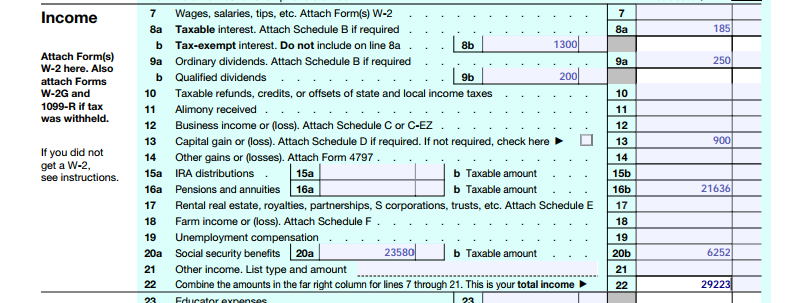
- Leaving out required information about taxable income. I can’t stress this enough, if you get something in the mail that says, “Important Tax Information Enclosed”, then there’s probably a number in that envelope that needs to go on your tax return. Here’s some common misconceptions:
- Just because you paid tax when you took money out of your 401(k) account, doesn’t mean you don’t have to report it on your tax return. It must be reported.
- Most retirement income is taxable on your federal return. Even if your retirement money isn’t taxable, it still gets reported on your tax return.
- The same holds true for tax exempt interest: you report it even if you don’t pay tax on it. And, a lot of federally tax exempt interest is taxable to your state. Don’t just leave that stuff off.
- Social security: for many people, social security isn’t taxable so a lot of folks just leave their social security off of their returns altogether. But for many folks, part of their social security is taxable. If you don’t include it in the calculations, you won’t know you missed it. Trust me, the IRS won’t miss the calculation if you owe tax on your Social Security.
- Along with reporting your social security, don’t forget to fill out all the boxes. In my state of Missouri, your medicare part B payment can actually reduce your taxes or qualify you for a larger property tax credit. Software programs are pretty good about making those things flow through to the pages they belong to. The key is that you have to input everything they ask you to.
Despite this list of common mistakes, you’re still much better off e-filing your return than preparing your taxes by hand. I did a separate post on common mistakes on paper filed tax returns: http://robergtaxsolutions.com/2012/02/four-most-common-mistakes-in-a-paper-tax-return/ – those mistakes are impossible to make when e-filing so you’re already ahead of the game. Besides, you now know what these common mistakes are so you’re not going to make them.